SmartRVRoute 2 RV Navigation
SmartRoutingTravel & Local
3.5101.00 Reviews
- Version
- 4.2.20260327_908
- Installs
- 10.00K
- Age Rating
- Everyone
Screenshots
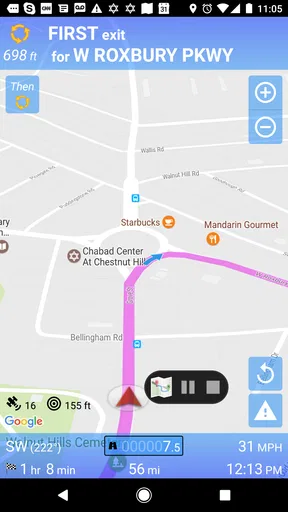
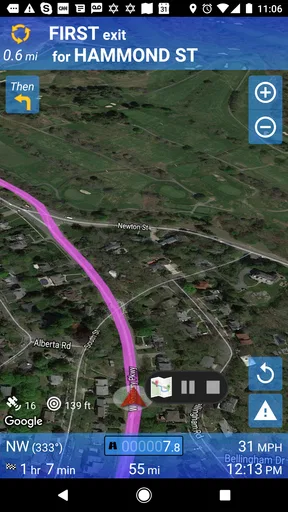
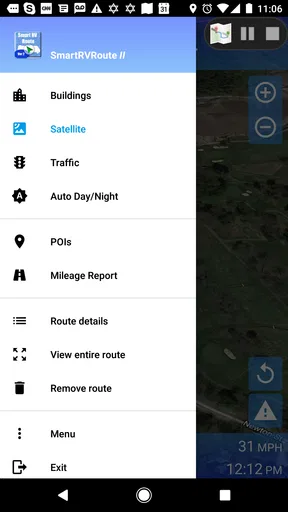
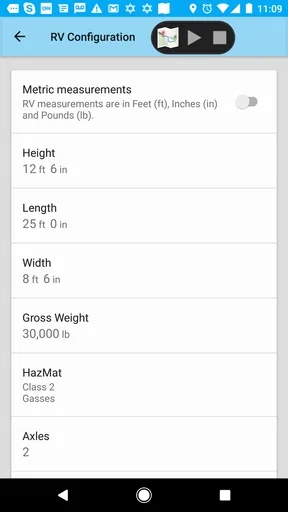
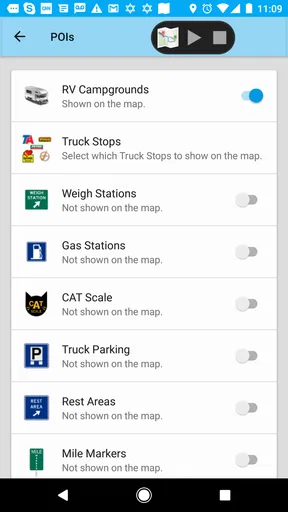
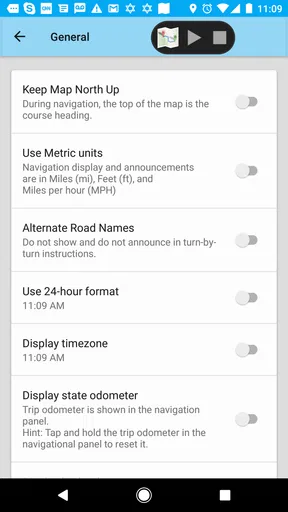
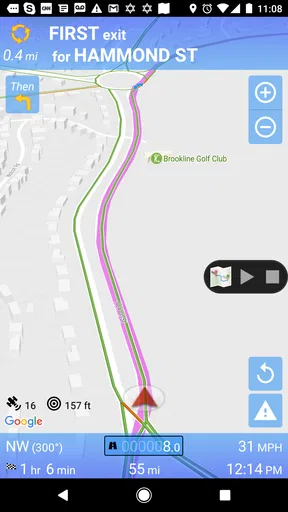
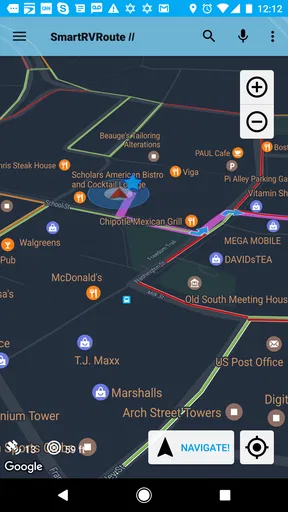
Our Review of SmartRVRoute 2 RV Navigation
 Analysis by Appyee
Driving a recreational vehicle changes the meaning of a “good route.” A road that is perfectly comfortable in a family car may be awkward or unsuitable when you are handling a tall, wide, heavy RV. After spending time with SmartRVRoute 2 RV Navigation, I see its main appeal clearly: it is aimed at travelers who want navigation built around the realities of RV driving rather than a standard turn-by-turn map experience. That focus gives it a useful purpose, but it also makes the app a more specialized choice than a universal navigation tool.
The app comes from SmartRouting and sits in the Travel & Local category. It is free to install, rated for Everyone, and supports devices running Android 6.0 or later. Its average rating is 3.5 from around 130 ratings, with about 101 written reviews, while the install count has passed 10,000. Those figures suggest a focused audience rather than a mainstream navigation giant. In my view, that is not automatically a problem: an RV driver needs the right kind of guidance more than a huge user base. Still, the modest rating makes it sensible to approach the app with realistic expectations.
Navigation designed around the RV problem
The strongest reason to consider this app is its purpose. Ordinary navigation apps generally optimize for getting a vehicle from one point to another quickly, often favoring roads that are efficient for typical cars. An RV driver has different priorities. Clearance, road suitability, turning space, and the stress of reaching an unfamiliar destination all matter. A route that looks short on a phone can become a poor choice once the vehicle is actually on the road.
That is where a dedicated RV navigation concept can be more valuable than simply using a familiar map app. I would not choose SmartRVRoute 2 because I wanted another generic map with a different color scheme. I would choose it when the vehicle itself affects the route decision. The app’s live RV GPS routing and navigation focus gives it a clear identity, and that identity is more important than having a long list of unrelated travel tools.
In everyday use, I found the most useful way to think about the app was as a planning companion rather than a magic guarantee. Before leaving a campsite, I would want to enter the destination, examine the proposed journey, and consider whether the route makes sense for the exact RV I am driving. That last step matters. Navigation software can support a decision, but it should not replace attention to road signs, local restrictions, campsite instructions, or conditions that may have changed since the route was calculated.
A realistic example is arriving at a campground after a long day on the highway. A normal car-focused app may guide you efficiently toward the entrance, but the final approach could involve narrow streets, sharp turns, or an awkward access road. A specialized RV tool is valuable because it encourages the driver to think about the route as an RV route from the beginning, not as a normal car trip with a large vehicle added afterward. That change in mindset is one of the app’s most meaningful strengths.
Why live routing matters on a long trip
RV journeys are rarely as predictable as a short city drive. Stops take longer, fuel planning is different, weather can affect progress, and a driver may decide to avoid a difficult road after seeing it in person. Live routing is therefore more useful than a fixed route saved before departure. If the journey changes, the navigation needs to remain practical instead of forcing the driver to start over with a separate tool.
I also appreciate that the app is aimed at people who may be traveling with a vehicle that requires more deliberate decisions. A route can be technically legal yet still uncomfortable for a particular driver. The best use of SmartRVRoute 2 is to combine its guidance with the driver’s own knowledge of the RV. Someone who knows the vehicle’s height, length, and handling characteristics can judge the suggestions far more effectively than someone who treats every navigation instruction as unquestionable.
One useful workflow is to check the route while parked, not while already moving. I would review the first major roads, the final approach, and any section that looks unusually indirect. This is a simple habit, but it turns the app from a voice prompt generator into a planning tool. It also reduces the temptation to make rushed corrections when towing, maneuvering through traffic, or approaching a busy junction.
What the app does better than a usual map alternative
The comparison with standard navigation apps is straightforward. A mainstream map app is usually better for broad everyday coverage, familiar place searches, public transport information, business details, and quick short-distance trips. It may also feel more polished to people who use it every day. For a normal car, that convenience can outweigh the benefits of a specialized product.
SmartRVRoute 2 makes more sense when the driver’s vehicle is the central concern. Its value is not that it replaces every travel feature found elsewhere. Its value is that it addresses a narrower problem: planning and following routes while thinking like an RV driver. If I were driving a compact car through a city, I would probably choose the usual map application. If I were taking a large motorhome into unfamiliar areas, I would at least want a dedicated RV-focused option available.
There is also a practical trade-off between simplicity and specialization. A general map app may require the driver to remember the vehicle’s limitations independently. A dedicated RV navigation app can make those limitations part of the route-planning conversation. That does not guarantee every recommendation will be suitable, but it makes the right questions harder to ignore. For me, that is a more important advantage than cosmetic differences between map screens.
Where the experience becomes less comfortable
The biggest point of friction is the subscription-based model. Although the app itself is free to install, it includes in-app purchases ranging from $24.99 to $199.99 per item. That is a substantial commitment for someone who only takes one RV trip each year. Before relying on it for a major journey, I would carefully examine what access is included and whether the intended travel pattern justifies the cost. The price structure makes this feel more like a serious navigation service than a casual free utility.
This matters because RV owners often already use another navigation app, printed campground information, vehicle-specific planning tools, or a dashboard system. Paying for a second navigation service only makes sense if the RV-focused routing solves a problem those alternatives do not. For frequent travelers, the cost may be easier to justify. For occasional renters or first-time RV users, it may be harder to see immediate value.
The average rating of 3.5 is another reason I would test the app before committing to an important trip. I do not read that score as proof that the app is poor, but it does suggest that the experience may not satisfy every driver equally. Navigation is especially sensitive to device behavior, route expectations, and personal driving habits. A feature that feels essential to one RV owner may seem unnecessary to another. Testing it on a familiar route is a sensible way to learn whether its approach fits you.
There is also a broader limitation with all specialized navigation: the software cannot know every real-world detail at the moment you arrive. Temporary construction, local access rules, a blocked entrance, poor weather, or a campground’s own directions can change the practical answer. I would never let a navigation instruction overrule a visible restriction or a clearly posted height warning. The app can help reduce risk, but it should remain one part of the driver’s decision-making process.
Another consideration is the difference between route guidance and trip preparation. A navigation app may help once the journey is underway, but it does not remove the need to prepare the RV itself. I would still check the vehicle, confirm the destination’s access instructions, plan breaks, and think about where turning or parking will be possible. The more demanding the trip, the less wise it is to treat any app as a complete travel plan.
Practical habits that make it more useful
My first recommendation is to use the app in two stages. Start with route planning while stationary, then use live guidance only after the route looks reasonable. This catches obvious problems before the vehicle is moving and gives the driver a chance to compare the suggested approach with campground or destination instructions. It is particularly useful when the final destination is in a residential area or a place with a complicated entrance.
Second, keep a backup method available. That does not mean constantly switching between apps while driving. It means having another way to understand the trip if the primary route becomes confusing or unusable. A printed note with the destination address, a saved overview, or a familiar general map can be enough to prevent a minor navigation issue from becoming a stressful roadside stop.
Third, treat route changes as decisions rather than commands. If SmartRVRoute 2 suggests a detour, I would ask why it is preferable for the RV before following it automatically. A longer route may be worthwhile if it avoids a difficult section, while a seemingly efficient shortcut may deserve closer inspection. This is one of the non-obvious benefits of using a specialist tool: it encourages more thoughtful routing, but only if the driver remains engaged.
Finally, I would avoid evaluating the app on a single short drive. The real question is how it behaves during the kind of travel for which it was designed: longer journeys, unfamiliar roads, and destinations where vehicle size affects the approach. A short local trip may not reveal enough to justify the subscription or to show the app’s best qualities. Testing a planned route before a major vacation gives a much fairer picture.
Who should use it, and who should skip it?
I think SmartRVRoute 2 is best suited to RV owners and regular travelers who genuinely need vehicle-aware route planning. It is especially relevant for people who have experienced the difference between a route that works for a car and one that feels sensible for a motorhome. Drivers who travel through unfamiliar regions, visit varied campgrounds, or prefer to plan carefully before setting off are the most likely to appreciate its specialized purpose.
It may also appeal to someone who is tired of adapting a general navigation app to an RV manually. Instead of treating vehicle limitations as an afterthought, this app puts the RV at the center of the navigation experience. That can make trip preparation feel more deliberate and may reduce some of the uncertainty that comes with approaching a new destination in a large vehicle.
I would be more cautious about recommending it to occasional users. If you rent an RV for a single weekend, drive only on familiar roads, or already have a trusted navigation setup that handles your needs, the subscription cost may not feel worthwhile. The same applies to drivers who mainly want business searches, walking directions, public transportation, or quick urban navigation. This is not the app I would install as my general-purpose travel map.
It is also not the right choice for anyone who expects navigation software to make every driving decision automatically. RV travel still requires common sense, attention to signs, and awareness of the vehicle’s dimensions. If you prefer a simple app that gives familiar directions without asking you to think about specialized routing, a mainstream alternative may feel easier. SmartRVRoute 2 rewards a more involved approach.
Device compatibility is reasonably broad because the current version, 4.2.20260327_908, supports Android 6.0 and newer. That makes it accessible to people who are not using the latest phone, although I would still make sure the device is reliable enough for navigation and positioned safely before starting a trip. The app is free to download, but the paid subscription model should be considered part of the decision from the start rather than an unexpected detail after installation.
My final verdict
SmartRVRoute 2 RV Navigation has a clear thesis, and I think that clarity is its greatest asset. It is not trying to be the best map for every traveler. It is built around the idea that RVs need more careful routing than ordinary cars, and that is a worthwhile problem to address. When I imagine using it for a long trip to an unfamiliar campground, I can see the benefit of having a navigation tool that keeps the vehicle’s needs in focus.
At the same time, I would not recommend subscribing without first testing the experience on a realistic route. The paid access, the middling average rating, and the unavoidable limits of navigation data make a cautious trial sensible. The app should complement preparation, not replace it, and it should not be treated as a guarantee that every road or entrance will suit every RV.
My recommendation is specific: choose it if RV-sized routing is your regular travel concern, but skip it if you only need ordinary directions or take occasional trips. For the right driver, SmartRVRoute 2 can be a focused and useful part of a safer, less stressful travel routine. For everyone else, a familiar general navigation app will probably offer better value and broader everyday convenience.
Verdict
Strengths of SmartRVRoute 2 RV Navigation
- RV-specific routing considers vehicle size, height, and weight limits.
- Offline maps help maintain navigation when cellular coverage is unreliable.
- Useful campground and RV service information supports trip planning.
- Clear turn-by-turn guidance is easy to follow while driving.
- Route planning can help avoid unsuitable roads and low-clearance hazards.
Limitations of SmartRVRoute 2 RV Navigation
- Coverage and road restrictions may vary significantly by region.
- Some advanced navigation features may require a paid subscription.
- Map updates can consume considerable storage and mobile data.
- Incorrect vehicle dimensions could produce unsafe or unsuitable routes.
- The interface may feel less polished than mainstream navigation apps.
Other Releases by SmartRouting
View All
SmartTruckRoute Truck GPS Navi
Maps & Navigation4.1

SmartTruckRoute 2 Nav & IFTA
Maps & Navigation4.1
Similar Picks in This Category
View All
Google Maps
Google LLC3.4

Google Maps Go
Google LLC4.1

Booking.com: Hotels & Travel
Booking.com Hotels & Vacation Rentals4.8

Google Earth
Google LLC3.8

Skyscanner Flights Hotels Cars
Skyscanner Ltd4.8

trivago: Compare hotel prices
trivago N.V.4.4
Frequently Asked Questions
What is SmartRVRoute 2 RV Navigation, and who is it designed for?
SmartRVRoute 2 RV Navigation is a navigation app designed specifically for recreational vehicle drivers. Unlike a standard car GPS, it is intended to consider RV-related needs such as vehicle height, width, length, and weight when planning routes. It may be useful for motorhomes, travel trailers, fifth wheels, and other large vehicles that need to avoid unsuitable roads, bridges, tunnels, or restricted areas.
Does SmartRVRoute 2 require my RV dimensions and vehicle details?
Yes, entering accurate vehicle information is one of the most important steps when setting up the app. Details such as overall height, width, length, weight, and possibly trailer configuration help the navigation system select more appropriate roads. Before starting a trip, check that these values are correct, because incomplete or inaccurate information could result in routes that are unsuitable for your particular RV.
Can SmartRVRoute 2 work without an internet connection?
Offline availability depends on the version of the app and the map features included with your download or subscription. Some navigation applications allow users to save maps or routes for areas with limited coverage, while others require an active connection for route calculations, traffic information, or map updates. It is best to download any available offline data and test it before traveling through remote areas.
Does the app provide live traffic, road restrictions, and campground information?
SmartRVRoute 2 may combine RV-focused routing with useful travel information, but the exact features can depend on your platform, region, and account plan. Traffic conditions, road closures, low-clearance warnings, fuel stops, campgrounds, and other points of interest may not always be available everywhere or updated instantly. Drivers should still confirm important restrictions using road signs and official local information.
Is SmartRVRoute 2 a reliable replacement for traditional maps and careful trip planning?
The app can be a helpful planning and navigation tool, especially for drivers who want routes adapted to the dimensions of an RV. However, no navigation app should be treated as infallible. GPS errors, outdated map data, temporary closures, construction, weather, and incorrectly entered vehicle measurements can affect directions. Review the proposed route before departure, follow posted signs, and keep a backup map or navigation method available.
